Golden Panda Casino App: Download Guide for Mobile
Golden Panda launched in 2024 as a mobile-focused platform offering over 4,000 titles from providers including NetEnt, Pragmatic Play, and Evolution Gaming. The casino operates under a Curaçao Gaming License, which UK players should note differs from UKGC regulation. While the platform supports both iOS and Android devices through mobile site access, understanding the installation process and potential limitations helps set realistic expectations before committing deposits.
App Download & Installation
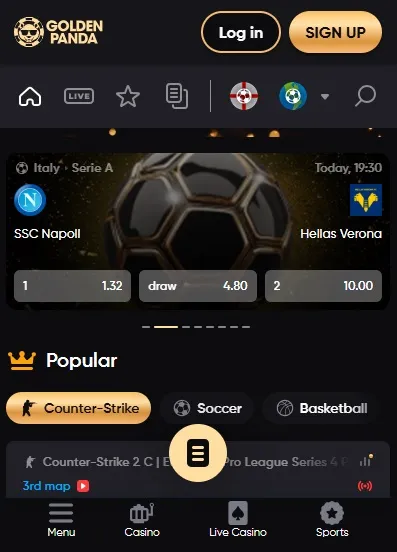
The golden panda casino app operates primarily as a mobile-optimized web application rather than a native download from official app stores. This approach bypasses Apple App Store and Google Play Store restrictions that often apply to real-money gambling platforms, particularly those licensed outside the UK Gambling Commission framework.
Players access the platform by navigating to the casino’s mobile site through their device’s browser. The system automatically detects device type and adjusts the interface accordingly. This browser-based solution eliminates download size concerns and ensures immediate access to the full game library without storage limitations.
For quick access, users can create a home screen shortcut:
- Open the casino site in Safari (iOS) or Chrome (Android)
- Tap the share icon or browser menu
- Select “Add to Home Screen”
- Name the shortcut and confirm
This method creates an app-like icon while maintaining browser-based functionality. The setup takes roughly 30 seconds and provides one-tap access similar to native applications.
iOS download steps
iPhone and iPad users experience straightforward access through Safari or alternative iOS browsers. The golden panda app interface adapts to various screen sizes, from iPhone SE to iPad Pro dimensions.
Standard iOS setup process:
Step 1: Open Safari and navigate to the official site
Step 2: Allow the site to load completely—initial loading may take 15-20 seconds on slower connections
Step 3: Test game functionality before creating the home screen shortcut
Step 4: Access Safari’s share menu (square with upward arrow)
Step 5: Scroll and select “Add to Home Screen”
Step 6: Customize the icon name if desired
iOS 14 and newer versions provide the smoothest experience, though iOS 12+ remains compatible. The platform requires JavaScript enabled and cookies permitted for login sessions to persist. Safari’s privacy settings occasionally block necessary functions, requiring adjustment in Settings > Safari > Privacy & Security.
Players using iOS should note that Apple’s restrictions prevent true native app distribution for many offshore-licensed casinos. The web app approach serves as the standard workaround, delivering equivalent functionality through optimized browser technology.

Android APK: safe install tips
Android’s open ecosystem technically permits APK installation from third-party sources, though Golden Panda’s primary mobile solution remains browser-based. If an APK file appears available, verification becomes critical to avoid security risks.
| Safety checkpoint | What to verify |
| Source URL | Must match official casino domain |
| File permissions | Should request only essential access |
| Digital signature | Check for valid certificate |
| File size | Compare against stated specifications |
| Antivirus scan | Run before installation |
Google Play Protect may flag casino APKs as potentially harmful due to real-money gambling content rather than actual malware. This warning doesn’t automatically indicate danger, but independent verification through VirusTotal or similar services adds security layer.
Installation requires enabling “Unknown Sources” in Android Settings > Security. This setting should be disabled after installation to prevent accidental installation of unverified apps later. Modern Android versions (8.0+) request permission per-app rather than system-wide, reducing overall risk exposure.
The golden panda casino app download process through APK should only proceed if the file comes directly from official casino communications—email, verified social media, or on-site download pages. Third-party APK repositories carry higher infection risk and may distribute modified versions containing malicious code.
System requirements & updates
Both iOS and Android devices need relatively modest specifications for optimal performance. Minimum requirements typically include:
- iOS: Version 12.0 or later, 2GB RAM, 100MB free storage
- Android: Version 7.0 or later, 2GB RAM, 150MB free storage
- Network: 4G/5G mobile data or WiFi with 5+ Mbps speeds
- Browser: Safari 12+, Chrome 80+, Firefox 75+
Live dealer games demand higher bandwidth—minimum 10 Mbps recommended for HD streaming without buffering. Evolution Gaming’s tables, which comprise significant portions of the live portfolio, perform best on 5G or stable WiFi connections.
Browser-based platforms automatically update server-side, eliminating manual update requirements. Players simply refresh their browser to access the latest features. This differs from native apps requiring regular downloads from app stores. The trade-off: no version control visibility and dependency on stable internet for feature access.
Clearing browser cache monthly prevents accumulated data from degrading performance. The process varies by device but generally appears under browser settings. Cached data for the casino site typically ranges 50-200MB after extended use.
Login, verification & first deposit
Account creation precedes app access. The registration process collects standard information: email, password, currency preference, and contact details. UK players should expect Know Your Customer (KYC) verification requests, though Curaçao-licensed casinos sometimes delay this until first withdrawal.
Initial deposit methods include Visa, Mastercard, Apple Pay, Google Pay, bank transfers, and cryptocurrency options (BTC, ETH, USDT, USDC, DOGE, XRP, BNB, SOL, DASH, BCH). Minimum deposit sits at €20 across payment types. Processing times vary—e-wallets and crypto execute instantly, while bank transfers may require 1-3 business days.
The welcome bonus structure (200% up to €7,500 + 10% weekly cashback) attaches wagering requirements that players should review before claiming. Terms typically specify rollover multiples, game contribution percentages, and maximum bet limits during bonus play.
Account verification usually requires:
- Government-issued photo ID (passport, driving licence)
- Proof of address (utility bill, bank statement dated within 90 days)
- Payment method confirmation (card photo, e-wallet screenshot)
Upload through the cashier section or email to support. Verification processing ranges from several hours to 48 hours depending on queue volume. Some players report extended verification periods based on third-party reviews, suggesting proactive document submission upon registration rather than waiting for withdrawal requests.
Common fixes: install & login errors
Browser compatibility issues: Outdated browser versions cause loading failures. Update to current release or switch browsers—Chrome and Safari show highest compatibility rates.
Connection timeouts: VPN usage sometimes triggers security blocks. Disable VPN and attempt direct connection. Geographic restrictions may apply based on IP location, as Curaçao licenses don’t guarantee universal access.
Login session expiry: Extended inactivity logs users out. Browser settings that delete cookies on exit prevent persistent sessions. Adjust privacy settings to allow necessary cookies or log in each session.
Payment method rejection: Cards registered to addresses outside accepted jurisdictions may decline. Cryptocurrency provides an alternative if traditional payment fails, though some UK banks block gambling transactions regardless of casino licensing.
Game loading failures: Insufficient RAM or outdated device software prevents certain titles from initializing. Closing background apps frees memory. Provider-specific issues sometimes affect entire categories—Pragmatic Play slots or Evolution tables—indicating server-side rather than device problems.
Account verification delays: Submit documents immediately after registration rather than waiting for withdrawal. Incomplete submissions extend processing time. Ensure file quality meets requirements: clear image text, no corners cut off, all edges visible.
Frequently Asked Questions
How do I download the app safely?
Golden Panda operates through mobile browser rather than a downloadable app. Visit the official site in Safari (iOS) or Chrome (Android), then add it to the home screen for quick access. Always verify the domain before entering credentials.
Can I play on both iOS and Android?
Yes, both systems work through browser access. Use the same account credentials across all devices—balance and game progress sync automatically.
What should I do if the app won’t load?
Clear browser cache, restart your device, and check internet connection. Update browser to latest version or try a different one. Disable VPN if active, as it may block access.